enEnglish
itItaliano
King flipchart.it - logo
  • Choose your KING
  • Accessories
    • KING Flipchart’s bags
    • Refill Paper Pads
    • Magnum Size Markers
  • Clients using KING
  • Testimonials
  • Info
    • What’s KING Flipchart?
    • The team of KING flipchart
    • History of KING flipchart
    • KING Flipchart Manifesto
    • FAQ
    • Contacts
  • Blog
Product has been added to your cart.

The Call to Tony Robbins: “Your Flipchart Paper Sucks”

Some business stories begin with a marketing plan.

Others begin with a phone call.

A bold one.

A slightly outrageous one.

The kind of call most people would never make.

This is the story of Tiziana, founder of KING Flipchart, and the day she called Robbins Research International, the organization behind Tony Robbins, with one unforgettable opening line:

“Can I talk to Tony Robbins?”

Of course, Tiziana knew exactly what she was doing.

She knew that getting Tony Robbins on the phone was not realistic.
She knew she was not going to be transferred directly to one of the most famous speakers and personal development figures in the world.

But that was not really the point.

The question was a provocation.

A door opener.

A way to make people stop, smile, and listen.

And it worked.

The Small Flipchart Paper Problem

Tiziana had seen Tony Robbins using a flipchart with a small pad of paper.

For most people, that would have been a meaningless detail.

For Tiziana, it was impossible to ignore.

Because when you understand live communication, you know that a flipchart is not just an office supply.

It is a stage tool.

It is part of the performance.

It is where ideas become visible.

It is where the speaker’s body, voice, movement, and message all come together.

And when a powerful communicator uses a writing surface that looks too small for the room, the audience, and the energy of the presentation, something feels off.

The message may still be strong.

The speaker may still be extraordinary.

But the tool is not supporting the performance at the same level.

That was the detail Tiziana saw.

And she did what very few people would have done.

She picked up the phone.

“I Need to Talk to Tony”

The scene almost feels like something from a movie.

Tiziana calls Robbins Research International.

Someone answers from the American office.

And Tiziana, with her fluent English and unmistakably charming Italian accent, says:

“I need to talk to Tony.”

In the background, she can hear people laughing.

Not in a rude way.

More like the amused reaction of an office suddenly interrupted by a woman from Italy confidently asking to speak with Tony Robbins as if it were the most natural request in the world.

And that was Tiziana’s magic.

She could be bold without being aggressive.

Direct without being unpleasant.

Provocative without losing elegance.

She knew the request was impossible.

That was exactly why it got attention.

Then she explained why she was calling.

She had seen Tony using a flipchart with small paper.

And she wanted them to tell him one thing:

“Tell him it sucks.”

The paper was not good enough.

Or, to say it more politely, it was not worthy of the level of presentation Tony Robbins was delivering.

The Black Belt of Phone Sales

Anyone who knows Tiziana understands why this story is so perfectly her.

She has always been what we like to call a black belt of phone sales.

Not because she is pushy.

Not because she follows scripts.

Not because she uses pressure.

Quite the opposite.

Her strength has always been a rare mix of courage, instinct, humor, commercial intelligence, and a natural ability to create human connections in seconds.

She knows how to enter a conversation.

She knows how to make people curious.

She knows how to say something memorable without sounding rude.

And above all, she understands something many salespeople forget:

If you want to be heard, sometimes you have to say what nobody else is saying.

Not a fake line.

Not a rehearsed pitch.

Not a polished corporate sentence.

A truth.

Said with confidence.

Said with timing.

Said with personality.

That is exactly what happened on that call.
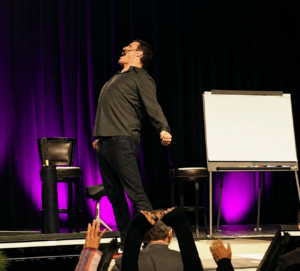
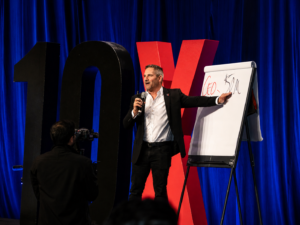
A speaker exuding energy and stage authority next to a premium KING Flipchart board during a live event, with audience members raising their hands.
The “Tony Robbins Effect” in action: How premium presentation tools instantly elevate your stage presence.

From a Criticism to a Proposal

Tiziana was not calling just to criticize.

After the joke, she introduced herself.

She explained that she was the owner of an Italian company producing a professional oversized flipchart system and custom-sized paper designed for serious presenters.

Not a standard office flipchart.

Not a generic easel.

A KING Flipchart.

A larger, more stable, more commanding presentation tool built for people who teach, lead, sell, train, and perform in front of an audience.

At that time, Tony Robbins was using an old De Lite flipchart, a sort of ancestor to the KING Flipchart. It was an interesting product, but it had been out of production for years.

The problem was clear.

A major communicator needed a serious writing surface.

A large presentation needed large paper.

And Tiziana had a solution.

So she said it.

Directly.

With humor.

With confidence.

And with that unmistakable Italian flair.

A Few Weeks Later, an Email Arrived

We do not know whether that phone call directly caused the first purchase.

It would not be honest to claim that.

Large organizations have internal processes, teams, timing, and decisions that are not always visible from the outside.

But we do know this:

A few weeks after that call, an email arrived from Robbins Research International with a purchase inquiry.

For us, that was an important moment.

Not just because of the name.

Not just because Tony Robbins is one of the most recognized live presenters in the world.

But because it confirmed something Tiziana had always believed:

Great communicators understand the value of the tools they use.

People who teach from the stage understand that every detail matters.

The room matters.

The lighting matters.

The body language matters.

The rhythm matters.

The materials matter.

And yes, the flipchart matters too.

Even the paper matters.

Why a Flipchart Is Never Just a Flipchart

To many people, a flipchart is a simple object.

An office item.

A stand with paper.

Something functional, maybe even forgettable.

But for high-level presenters, it is something else entirely.

When a speaker writes in front of an audience, that action becomes part of the presentation.

The hand movement.

The pause.

The drawing.

The diagram.

The sentence written in real time.

The moment when an idea takes physical form.

That moment has power.

But only if the tool supports it.

If the paper is too small, the idea feels smaller.

If the stand is unstable, the presenter loses authority.

If the writing surface is limited, the speaker’s movement becomes limited too.

And when the tool looks ordinary, the presentation can lose part of its impact.

KING Flipchart was created to solve exactly that problem.

It was designed for professionals who do not use a flipchart as a secondary prop, but as a central part of how they communicate.

For trainers.

For speakers.

For coaches.

For consultants.

For entrepreneurs.

For attorneys.

For anyone who needs to explain important ideas in front of real people.

The Courage to Say the Obvious

The call to Robbins Research International was more than a funny sales story.

It revealed a philosophy.

The philosophy of someone who looks at a world-famous presenter and does not think:

“He is too important to listen to me.”

Instead, she thinks:

“I can help him present better.”

That is a very different mindset.

It is not arrogance.

It is confidence in the product.

It is respect for the professional.

It is the ability to see a gap and say something about it.

Tiziana did not call to flatter.

She did not call to ask for attention.

She called because she had noticed something real.

A world-class speaker was using paper that did not match the power of his performance.

And she had the courage to say it.

A Very Italian Kind of Boldness

There was something deeply Italian about that call.

Not loud.

Not messy.

Not improvised in the wrong way.

But bold, human, theatrical, and full of personality.

Tiziana’s English was fluent, but her Italian accent made the sentence even more memorable.

“Tell him it sucks.”

It was not polished corporate language.

It was not safe.

It was not the kind of sentence you would find in a sales manual.

That is why people remembered it.

And that is why it worked as a door opener.

Because behind the sentence there was not just provocation.

There was expertise.

There was a product.

There was a specific observation.

There was a solution.

That is the difference between being rude and being memorable.

From One Phone Call to a Brand Story

Over time, that call became a small internal legend.

Not because we know exactly what happened afterward inside Robbins Research International.

We do not.

But because the story captures the spirit of KING Flipchart perfectly.

A premium presentation tool is not created by people who think small.

It is created by people who notice when the tool does not match the performer.

It is created by people who believe that the way an idea is presented changes the way it is perceived.

It is created by people who understand that authority is not only in the words you say, but also in the way you occupy the room.

KING Flipchart was never meant to be a cheap flipchart.

It was never meant to be just another office product.

It was created for professionals who perform under pressure.

People who stand in front of an audience and have to make ideas clear, memorable, and persuasive.

People who know that presence matters.

People who know that tools matter.

People who know that bigger ideas deserve a bigger stage.

The Lesson Behind the Call

This story is not only about sales.

It is about attention.

It is about courage.

It is about positioning.

It is about seeing what others ignore.

A small piece of paper on a big stage may seem like a minor detail.

But to someone who understands presentation, it is not minor at all.

It is a signal.

Tiziana saw that signal.

Then she did what great salespeople do.

She turned an observation into a conversation.

She turned a conversation into an opportunity.

And she turned an opportunity into a story.

A story that still represents the KING Flipchart spirit today.

Because when you believe your product belongs in the hands of world-class communicators, you cannot just wait for the world to discover it.

Sometimes, you have to pick up the phone.

Ask for Tony.

And tell the truth.

Team KING Flipchart
#astepahead

llustrazione fumettistica di Tiziana al telefono con un ufficio americano, ispirata alla telefonata a Robbins Research International per KING Flipchart.
Comic-style illustration of Tiziana on the phone with an American office, inspired by her bold call to Robbins Research International for KING Flipchart.

Ultimi articoli dal Blog

Alex Hormozi using a KING Flipchart during a business training presentation

Alex Hormozi Uses KING Flipchart for Business Ideas

Grant Cardone speaking on stage beside a large KING Flipchart during a training event.

Whiteboard for Videos: Why Hormozi, Brunson and Cardone Use a Physical Board

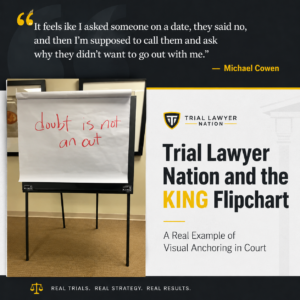
KING Flipchart featured in a Trial Lawyer Nation article cover about visual anchoring in court.

Trial Lawyer Nation and the KING Flipchart: A Real Example of Visual Anchoring in Court

Trial Lawyer Nation and the KING Flipchart: A Real Example of Visual Anchoring in Court
Whiteboard for Videos: Why Hormozi, Brunson and Cardone Use a Physical Board

CONTACTS

[email protected]
+39 370 304 9754
+39 328 976 6697

SECURE PAYMENTS

KING Flipchart.it - secure payments

QUICK LINKS

  • FAQ
  • Terms and Conditions
  • Cookie policy
  • Privacy Policy
  • Return and refund
  • Handle the delivery
  • Secure Payment
  • Terms of Delivery
King flipchart.it

KING is the unique Flipchart expressly designed for Experts and it’s Next to the Top Ones, all over the world!
KING is exclusive: giant, foldable and portable. This is the only flipchart with the double-wide panel granting the lanscape vision.

© 2026 CENTO PER CENTO IDEA SRL
VAT: IT-10779660017 – PEC [email protected] – SDI 5RUO82D
design by Caleidoscopio Web

Manage Consent

Utilizziamo cookie per migliorare la tua esperienza sul sito. Puoi accettare, rifiutare o personalizzare le tue preferenze.

Funzionale Always active
L'archiviazione tecnica o l'accesso sono strettamente necessari al fine legittimo di consentire l'uso di un servizio specifico esplicitamente richiesto dall'abbonato o dall'utente, o al solo scopo di effettuare la trasmissione di una comunicazione su una rete di comunicazione elettronica.
Preferenze
L'archiviazione tecnica o l'accesso sono necessari per lo scopo legittimo di memorizzare le preferenze che non sono richieste dall'abbonato o dall'utente.
Statistiche
L'archiviazione tecnica o l'accesso che viene utilizzato esclusivamente per scopi statistici. L'archiviazione tecnica o l'accesso che viene utilizzato esclusivamente per scopi statistici anonimi. Senza un mandato di comparizione, una conformità volontaria da parte del vostro Fornitore di Servizi Internet, o ulteriori registrazioni da parte di terzi, le informazioni memorizzate o recuperate per questo scopo da sole non possono di solito essere utilizzate per l'identificazione.
Marketing
L'archiviazione tecnica o l'accesso sono necessari per creare profili di utenti per inviare pubblicità, o per tracciare l'utente su un sito web o su diversi siti web per scopi di marketing simili.
  • Manage options
  • Manage services
  • Manage {vendor_count} vendors
  • Read more about these purposes
View preferences
  • {title}
  • {title}
  • {title}

Accessibility

Accessibility modes

Epilepsy Safe Mode
Dampens color and removes blinks
This mode enables people with epilepsy to use the website safely by eliminating the risk of seizures that result from flashing or blinking animations and risky color combinations.
Visually Impaired Mode
Improves website's visuals
This mode adjusts the website for the convenience of users with visual impairments such as Degrading Eyesight, Tunnel Vision, Cataract, Glaucoma, and others.
Cognitive Disability Mode
Helps to focus on specific content
This mode provides different assistive options to help users with cognitive impairments such as Dyslexia, Autism, CVA, and others, to focus on the essential elements of the website more easily.
ADHD Friendly Mode
Reduces distractions and improve focus
This mode helps users with ADHD and Neurodevelopmental disorders to read, browse, and focus on the main website elements more easily while significantly reducing distractions.
Blindness Mode
Allows using the site with your screen-reader
This mode configures the website to be compatible with screen-readers such as JAWS, NVDA, VoiceOver, and TalkBack. A screen-reader is software for blind users that is installed on a computer and smartphone, and websites must be compatible with it.

Online Dictionary

    Readable Experience

    Content Scaling
    Default
    Text Magnifier
    Readable Font
    Dyslexia Friendly
    Highlight Titles
    Highlight Links
    Font Sizing
    Default
    Line Height
    Default
    Letter Spacing
    Default
    Left Aligned
    Center Aligned
    Right Aligned

    Visually Pleasing Experience

    Dark Contrast
    Light Contrast
    Monochrome
    High Contrast
    High Saturation
    Low Saturation
    Adjust Text Colors
    Adjust Title Colors
    Adjust Background Colors

    Easy Orientation

    Mute Sounds
    Hide Images
    Virtual Keyboard
    Reading Guide
    Stop Animations
    Reading Mask
    Highlight Hover
    Highlight Focus
    Big Dark Cursor
    Big Light Cursor
    Cognitive Reading
    Navigation Keys
    Voice Navigation

    KING Flipchart

    Accessibility Statement

    • www.flipchart.it
    • 4 November 2026

    Compliance status

    We firmly believe that the internet should be available and accessible to anyone, and are committed to providing a website that is accessible to the widest possible audience, regardless of circumstance and ability.

    To fulfill this, we aim to adhere as strictly as possible to the World Wide Web Consortium’s (W3C) Web Content Accessibility Guidelines 2.1 (WCAG 2.1) at the AA level. These guidelines explain how to make web content accessible to people with a wide array of disabilities. Complying with those guidelines helps us ensure that the website is accessible to all people: blind people, people with motor impairments, visual impairment, cognitive disabilities, and more.

    This website utilizes various technologies that are meant to make it as accessible as possible at all times. We utilize an accessibility interface that allows persons with specific disabilities to adjust the website’s UI (user interface) and design it to their personal needs.

    Additionally, the website utilizes an AI-based application that runs in the background and optimizes its accessibility level constantly. This application remediates the website’s HTML, adapts Its functionality and behavior for screen-readers used by the blind users, and for keyboard functions used by individuals with motor impairments.

    If you’ve found a malfunction or have ideas for improvement, we’ll be happy to hear from you. You can reach out to the website’s operators by using the following email [email protected]

    Screen-reader and keyboard navigation

    Our website implements the ARIA attributes (Accessible Rich Internet Applications) technique, alongside various different behavioral changes, to ensure blind users visiting with screen-readers are able to read, comprehend, and enjoy the website’s functions. As soon as a user with a screen-reader enters your site, they immediately receive a prompt to enter the Screen-Reader Profile so they can browse and operate your site effectively. Here’s how our website covers some of the most important screen-reader requirements, alongside console screenshots of code examples:

    1. Screen-reader optimization: we run a background process that learns the website’s components from top to bottom, to ensure ongoing compliance even when updating the website. In this process, we provide screen-readers with meaningful data using the ARIA set of attributes. For example, we provide accurate form labels; descriptions for actionable icons (social media icons, search icons, cart icons, etc.); validation guidance for form inputs; element roles such as buttons, menus, modal dialogues (popups), and others. Additionally, the background process scans all of the website’s images and provides an accurate and meaningful image-object-recognition-based description as an ALT (alternate text) tag for images that are not described. It will also extract texts that are embedded within the image, using an OCR (optical character recognition) technology. To turn on screen-reader adjustments at any time, users need only to press the Alt+1 keyboard combination. Screen-reader users also get automatic announcements to turn the Screen-reader mode on as soon as they enter the website.

      These adjustments are compatible with all popular screen readers, including JAWS and NVDA.

    2. Keyboard navigation optimization: The background process also adjusts the website’s HTML, and adds various behaviors using JavaScript code to make the website operable by the keyboard. This includes the ability to navigate the website using the Tab and Shift+Tab keys, operate dropdowns with the arrow keys, close them with Esc, trigger buttons and links using the Enter key, navigate between radio and checkbox elements using the arrow keys, and fill them in with the Spacebar or Enter key.Additionally, keyboard users will find quick-navigation and content-skip menus, available at any time by clicking Alt+1, or as the first elements of the site while navigating with the keyboard. The background process also handles triggered popups by moving the keyboard focus towards them as soon as they appear, and not allow the focus drift outside of it.

      Users can also use shortcuts such as “M” (menus), “H” (headings), “F” (forms), “B” (buttons), and “G” (graphics) to jump to specific elements.

    Disability profiles supported in our website

    • Epilepsy Safe Mode: this profile enables people with epilepsy to use the website safely by eliminating the risk of seizures that result from flashing or blinking animations and risky color combinations.
    • Visually Impaired Mode: this mode adjusts the website for the convenience of users with visual impairments such as Degrading Eyesight, Tunnel Vision, Cataract, Glaucoma, and others.
    • Cognitive Disability Mode: this mode provides different assistive options to help users with cognitive impairments such as Dyslexia, Autism, CVA, and others, to focus on the essential elements of the website more easily.
    • ADHD Friendly Mode: this mode helps users with ADHD and Neurodevelopmental disorders to read, browse, and focus on the main website elements more easily while significantly reducing distractions.
    • Blindness Mode: this mode configures the website to be compatible with screen-readers such as JAWS, NVDA, VoiceOver, and TalkBack. A screen-reader is software for blind users that is installed on a computer and smartphone, and websites must be compatible with it.
    • Keyboard Navigation Profile (Motor-Impaired): this profile enables motor-impaired persons to operate the website using the keyboard Tab, Shift+Tab, and the Enter keys. Users can also use shortcuts such as “M” (menus), “H” (headings), “F” (forms), “B” (buttons), and “G” (graphics) to jump to specific elements.

    Additional UI, design, and readability adjustments

    1. Font adjustments – users, can increase and decrease its size, change its family (type), adjust the spacing, alignment, line height, and more.
    2. Color adjustments – users can select various color contrast profiles such as light, dark, inverted, and monochrome. Additionally, users can swap color schemes of titles, texts, and backgrounds, with over 7 different coloring options.
    3. Animations – epileptic users can stop all running animations with the click of a button. Animations controlled by the interface include videos, GIFs, and CSS flashing transitions.
    4. Content highlighting – users can choose to emphasize important elements such as links and titles. They can also choose to highlight focused or hovered elements only.
    5. Audio muting – users with hearing devices may experience headaches or other issues due to automatic audio playing. This option lets users mute the entire website instantly.
    6. Cognitive disorders – we utilize a search engine that is linked to Wikipedia and Wiktionary, allowing people with cognitive disorders to decipher meanings of phrases, initials, slang, and others.
    7. Additional functions – we provide users the option to change cursor color and size, use a printing mode, enable a virtual keyboard, and many other functions.

    Browser and assistive technology compatibility

    We aim to support the widest array of browsers and assistive technologies as possible, so our users can choose the best fitting tools for them, with as few limitations as possible. Therefore, we have worked very hard to be able to support all major systems that comprise over 95% of the user market share including Google Chrome, Mozilla Firefox, Apple Safari, Opera and Microsoft Edge, JAWS and NVDA (screen readers), both for Windows and for MAC users.

    Notes, comments, and feedback

    Despite our very best efforts to allow anybody to adjust the website to their needs, there may still be pages or sections that are not fully accessible, are in the process of becoming accessible, or are lacking an adequate technological solution to make them accessible. Still, we are continually improving our accessibility, adding, updating and improving its options and features, and developing and adopting new technologies. All this is meant to reach the optimal level of accessibility, following technological advancements. For any assistance, please reach out to [email protected]