enEnglish
itItaliano
King flipchart.it - logo
  • Choose your KING
  • Accessories
    • KING Flipchart’s bags
    • Magnum Size Markers
    • Refill Paper Pads
  • Clients using KING
  • Testimonials
  • Info
    • What’s KING Flipchart?
    • The team of KING flipchart
    • History of KING flipchart
    • KING Flipchart Manifesto
    • FAQ
    • Contacts
  • Blog
Product has been added to your cart.

How to Introduce Yourself Effectively in Business: 2 Key Frameworks

In the business world, being able to communicate your value proposition clearly is everything.
Let’s dive into how to introduce yourself effectively using two proven strategic communication frameworks.

The truth is, people want to understand things quickly and effortlessly.
If you want to be recognized as a credible expert in your niche, the very first skill you must master is explaining who you are and what you do.
People are incredibly busy, and quite frankly, at first, they don’t care about what you do, how long you’ve been doing it, or your personalized services.
Your audience and prospective clients care about only one thing: how you can improve their lives.
Period.

The Two Fatal Mistakes in Corporate Communication

When explaining our professions or businesses, we generally fall into two classic traps that kill our authority:

  1. Starting the story with your ancestors: “Our renowned company was founded in the 1950s thanks to the entrepreneurial courage of the current president’s grandfather who…”
    By doing this, you instantly bore your listener to death, and they can’t wait to escape.
  2. Describing your activity in a superficial, generic way: “I am a sales rep,” “I work in telecom,” or “I operate in the non-profit sector.”
    This approach completely fails to explain the actual utility of your actions and wrongly assumes that everyone already understands your products or services, creating massive confusion.

Capturing someone’s attention within the first few seconds is vital, yet few are taught how to do it correctly.
Today, I will reveal 2 simple and highly impactful business communication techniques that will instantly set you apart from your competitors.

Mastering the Power of the Elevator Pitch

When it comes to business communication, Americans are the undisputed masters of brevity. They engineered the concept of the Elevator Pitch.

An Elevator Pitch is the exact concise summary an entrepreneur would deliver to a potential investor if they happened to catch them inside an elevator.
You only have the duration of the ride (about 30 to 60 seconds) to outline your business in a clear, concise, and compelling way, convincing them to invest in your project before the doors open.

While this is an extreme scenario, the core principle is undeniably powerful: your business must be summarized in a way that is concise, easy to comprehend, and above all, useful to the listener.

I know this from direct personal experience. As an entrepreneur and inventor, alongside my business partner Tiziana, I have delivered dozens of pitches to institutional investors at numerous high-stakes events hosted by innovative startup incubators.
These experiences on the ground taught me how vital it is to hook your audience by speaking exclusively about what matters to THEM.

Framework #1: The Golden Formula of Clarity

Let’s start practicing with the simplest, yet incredibly powerful version of a pitch:

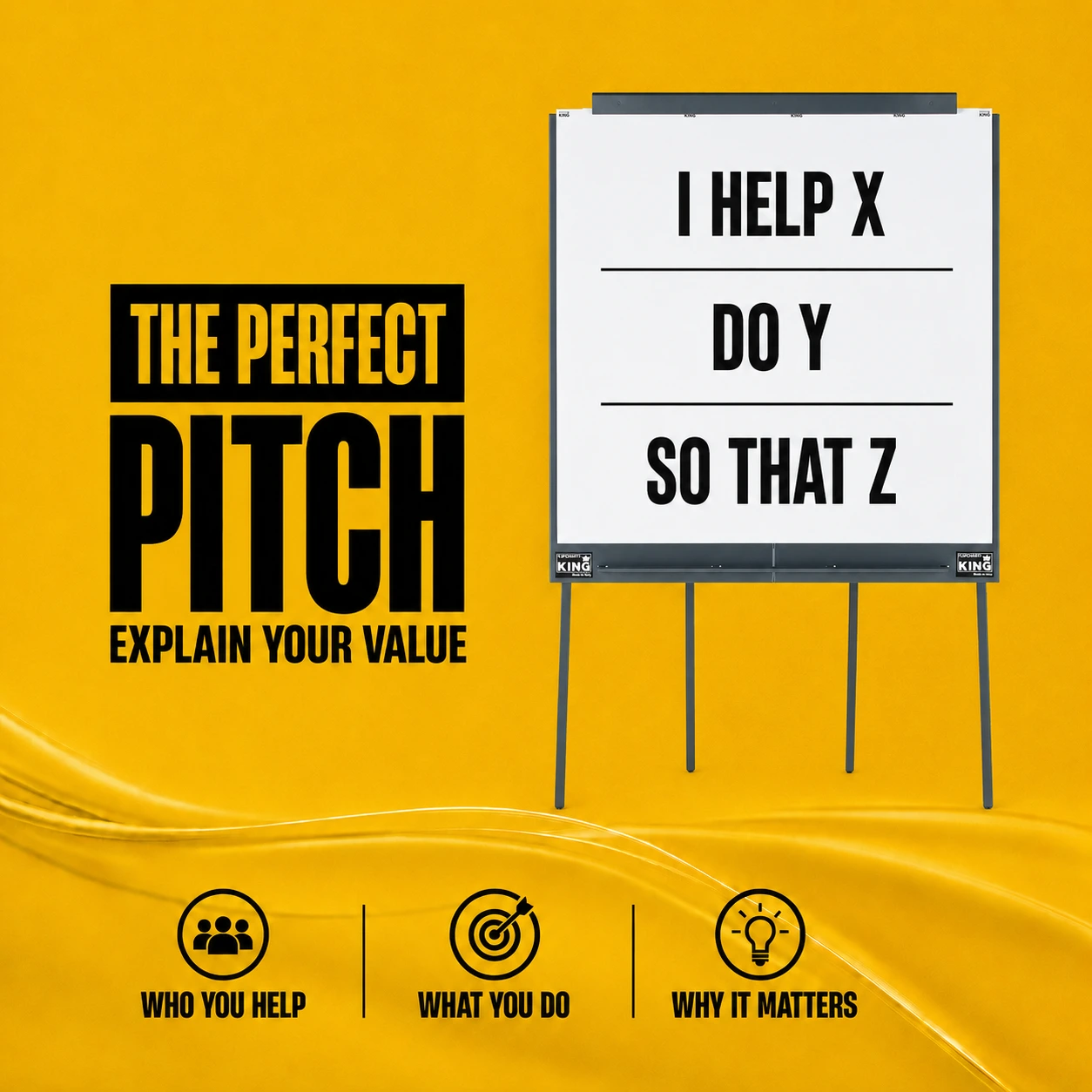
I HELP X, DO Y, SO THAT Z.

Let’s break this down with a practical example:

  • I HELP X: “I am a web designer who helps businesses…”
  • DO Y: “…build a professional and highly effective online presence…”
  • SO THAT Z: “…so that they attract highly targeted traffic that converts into paying customers.”

In three short lines, you’ve said it all.
This exercise forces you to look at your operations through the eyes of your target market, highlighting the real benefits and trimming the fluff.

Framework #2: The Precision Metrics Formula

The second framework takes things a step further.
Whether your client is an individual or a major corporation, they have core pain points or desires waiting to be solved (lack of leads, declining revenue, energy waste, or lack of free time).

To be highly persuasive, remember that people ALWAYS want to know just 3 things from you:

  1. What specific problem can you fix or enhance.
  2. How exactly do you do it.
  3. In what specific timeframe or measurable percentage (providing real, verifiable numbers skyrockets your credibility).

Let’s look at a few examples:

  • Energy Provider: “I help corporations cut electricity costs by 15% to 26% starting from the very first billing cycle.”
  • Personal Trainer: “Using my proprietary training system, I increase weightlifting power by 3% to 5% within the first 90 days.”
  • Real Estate Agent: “I maximize your property’s market value by 8% to 13% by optimizing 13 critical negotiation checkpoints through an exclusive method.”

Our Formula Applied to KING Flipchart

In our specific case, we applied this exact golden rule to our flagship product:

“We engineered KING Flipchart, the professional presentation board custom-designed for speakers addressing large audiences, increasing presentation visibility by 80% compared to standard easel boards.”

If you want to understand how this core focus disrupted the international seminar and corporate presentation industry, I invite you to explore our origin story.

Discover how the Grand KING Flipchart was born

Start implementing these frameworks today to introduce yourself effectively and transform your business networking.
I am confident this article will give you an unfair advantage!

To your success!

Sandro Rizzo
Co-founder & Inventor of KING Flipchart
the perfect pitch

Ultimi articoli dal Blog

KING Flipchart professional board positioned in a conference room with an audience. Text in the image: KING Flipchart: Engineered for Presentation Spaces. Next to the best.

The Executive Meeting Paradox: Elite Conference Room Setup

From the throne to the chair explains how furniture reflects who you are

From Thrones to Stage Presence: Professional Visual Communication & Status

Free of charge we never heard these funny words
From Thrones to Stage Presence: Professional Visual Communication & Status

CONTACTS

info@100x100idea.it
+39 370 304 9754
+39 328 976 6697

SECURE PAYMENTS

KING Flipchart.it - secure payments

QUICK LINKS

  • FAQ
  • Terms and Conditions
  • Cookie policy
  • Privacy Policy
  • Return and refund
  • Handle the delivery
  • Secure Payment
  • Terms of Delivery
King flipchart.it

KING is the unique Flipchart expressly designed for Experts and it’s Next to the Top Ones, all over the world!
KING is exclusive: giant, foldable and portable. This is the only flipchart with the double-wide panel granting the lanscape vision.

© 2023 CENTO PER CENTO IDEA SRL
VAT: IT-10779660017 – PEC 100x100idea@pec.it – SDI 5RUO82D
design by Caleidoscopio Web

Accessibility

Accessibility modes

Epilepsy Safe Mode
Dampens color and removes blinks
This mode enables people with epilepsy to use the website safely by eliminating the risk of seizures that result from flashing or blinking animations and risky color combinations.
Visually Impaired Mode
Improves website's visuals
This mode adjusts the website for the convenience of users with visual impairments such as Degrading Eyesight, Tunnel Vision, Cataract, Glaucoma, and others.
Cognitive Disability Mode
Helps to focus on specific content
This mode provides different assistive options to help users with cognitive impairments such as Dyslexia, Autism, CVA, and others, to focus on the essential elements of the website more easily.
ADHD Friendly Mode
Reduces distractions and improve focus
This mode helps users with ADHD and Neurodevelopmental disorders to read, browse, and focus on the main website elements more easily while significantly reducing distractions.
Blindness Mode
Allows using the site with your screen-reader
This mode configures the website to be compatible with screen-readers such as JAWS, NVDA, VoiceOver, and TalkBack. A screen-reader is software for blind users that is installed on a computer and smartphone, and websites must be compatible with it.

Online Dictionary

    Readable Experience

    Content Scaling
    Default
    Text Magnifier
    Readable Font
    Dyslexia Friendly
    Highlight Titles
    Highlight Links
    Font Sizing
    Default
    Line Height
    Default
    Letter Spacing
    Default
    Left Aligned
    Center Aligned
    Right Aligned

    Visually Pleasing Experience

    Dark Contrast
    Light Contrast
    Monochrome
    High Contrast
    High Saturation
    Low Saturation
    Adjust Text Colors
    Adjust Title Colors
    Adjust Background Colors

    Easy Orientation

    Mute Sounds
    Hide Images
    Virtual Keyboard
    Reading Guide
    Stop Animations
    Reading Mask
    Highlight Hover
    Highlight Focus
    Big Dark Cursor
    Big Light Cursor
    Cognitive Reading
    Navigation Keys
    Voice Navigation

    KING Flipchart

    Accessibility Statement

    • www.flipchart.it
    • 10 June 2026

    Compliance status

    We firmly believe that the internet should be available and accessible to anyone, and are committed to providing a website that is accessible to the widest possible audience, regardless of circumstance and ability.

    To fulfill this, we aim to adhere as strictly as possible to the World Wide Web Consortium’s (W3C) Web Content Accessibility Guidelines 2.1 (WCAG 2.1) at the AA level. These guidelines explain how to make web content accessible to people with a wide array of disabilities. Complying with those guidelines helps us ensure that the website is accessible to all people: blind people, people with motor impairments, visual impairment, cognitive disabilities, and more.

    This website utilizes various technologies that are meant to make it as accessible as possible at all times. We utilize an accessibility interface that allows persons with specific disabilities to adjust the website’s UI (user interface) and design it to their personal needs.

    Additionally, the website utilizes an AI-based application that runs in the background and optimizes its accessibility level constantly. This application remediates the website’s HTML, adapts Its functionality and behavior for screen-readers used by the blind users, and for keyboard functions used by individuals with motor impairments.

    If you’ve found a malfunction or have ideas for improvement, we’ll be happy to hear from you. You can reach out to the website’s operators by using the following email info@100x100idea.it

    Screen-reader and keyboard navigation

    Our website implements the ARIA attributes (Accessible Rich Internet Applications) technique, alongside various different behavioral changes, to ensure blind users visiting with screen-readers are able to read, comprehend, and enjoy the website’s functions. As soon as a user with a screen-reader enters your site, they immediately receive a prompt to enter the Screen-Reader Profile so they can browse and operate your site effectively. Here’s how our website covers some of the most important screen-reader requirements, alongside console screenshots of code examples:

    1. Screen-reader optimization: we run a background process that learns the website’s components from top to bottom, to ensure ongoing compliance even when updating the website. In this process, we provide screen-readers with meaningful data using the ARIA set of attributes. For example, we provide accurate form labels; descriptions for actionable icons (social media icons, search icons, cart icons, etc.); validation guidance for form inputs; element roles such as buttons, menus, modal dialogues (popups), and others. Additionally, the background process scans all of the website’s images and provides an accurate and meaningful image-object-recognition-based description as an ALT (alternate text) tag for images that are not described. It will also extract texts that are embedded within the image, using an OCR (optical character recognition) technology. To turn on screen-reader adjustments at any time, users need only to press the Alt+1 keyboard combination. Screen-reader users also get automatic announcements to turn the Screen-reader mode on as soon as they enter the website.

      These adjustments are compatible with all popular screen readers, including JAWS and NVDA.

    2. Keyboard navigation optimization: The background process also adjusts the website’s HTML, and adds various behaviors using JavaScript code to make the website operable by the keyboard. This includes the ability to navigate the website using the Tab and Shift+Tab keys, operate dropdowns with the arrow keys, close them with Esc, trigger buttons and links using the Enter key, navigate between radio and checkbox elements using the arrow keys, and fill them in with the Spacebar or Enter key.Additionally, keyboard users will find quick-navigation and content-skip menus, available at any time by clicking Alt+1, or as the first elements of the site while navigating with the keyboard. The background process also handles triggered popups by moving the keyboard focus towards them as soon as they appear, and not allow the focus drift outside of it.

      Users can also use shortcuts such as “M” (menus), “H” (headings), “F” (forms), “B” (buttons), and “G” (graphics) to jump to specific elements.

    Disability profiles supported in our website

    • Epilepsy Safe Mode: this profile enables people with epilepsy to use the website safely by eliminating the risk of seizures that result from flashing or blinking animations and risky color combinations.
    • Visually Impaired Mode: this mode adjusts the website for the convenience of users with visual impairments such as Degrading Eyesight, Tunnel Vision, Cataract, Glaucoma, and others.
    • Cognitive Disability Mode: this mode provides different assistive options to help users with cognitive impairments such as Dyslexia, Autism, CVA, and others, to focus on the essential elements of the website more easily.
    • ADHD Friendly Mode: this mode helps users with ADHD and Neurodevelopmental disorders to read, browse, and focus on the main website elements more easily while significantly reducing distractions.
    • Blindness Mode: this mode configures the website to be compatible with screen-readers such as JAWS, NVDA, VoiceOver, and TalkBack. A screen-reader is software for blind users that is installed on a computer and smartphone, and websites must be compatible with it.
    • Keyboard Navigation Profile (Motor-Impaired): this profile enables motor-impaired persons to operate the website using the keyboard Tab, Shift+Tab, and the Enter keys. Users can also use shortcuts such as “M” (menus), “H” (headings), “F” (forms), “B” (buttons), and “G” (graphics) to jump to specific elements.

    Additional UI, design, and readability adjustments

    1. Font adjustments – users, can increase and decrease its size, change its family (type), adjust the spacing, alignment, line height, and more.
    2. Color adjustments – users can select various color contrast profiles such as light, dark, inverted, and monochrome. Additionally, users can swap color schemes of titles, texts, and backgrounds, with over 7 different coloring options.
    3. Animations – epileptic users can stop all running animations with the click of a button. Animations controlled by the interface include videos, GIFs, and CSS flashing transitions.
    4. Content highlighting – users can choose to emphasize important elements such as links and titles. They can also choose to highlight focused or hovered elements only.
    5. Audio muting – users with hearing devices may experience headaches or other issues due to automatic audio playing. This option lets users mute the entire website instantly.
    6. Cognitive disorders – we utilize a search engine that is linked to Wikipedia and Wiktionary, allowing people with cognitive disorders to decipher meanings of phrases, initials, slang, and others.
    7. Additional functions – we provide users the option to change cursor color and size, use a printing mode, enable a virtual keyboard, and many other functions.

    Browser and assistive technology compatibility

    We aim to support the widest array of browsers and assistive technologies as possible, so our users can choose the best fitting tools for them, with as few limitations as possible. Therefore, we have worked very hard to be able to support all major systems that comprise over 95% of the user market share including Google Chrome, Mozilla Firefox, Apple Safari, Opera and Microsoft Edge, JAWS and NVDA (screen readers), both for Windows and for MAC users.

    Notes, comments, and feedback

    Despite our very best efforts to allow anybody to adjust the website to their needs, there may still be pages or sections that are not fully accessible, are in the process of becoming accessible, or are lacking an adequate technological solution to make them accessible. Still, we are continually improving our accessibility, adding, updating and improving its options and features, and developing and adopting new technologies. All this is meant to reach the optimal level of accessibility, following technological advancements. For any assistance, please reach out to info@100x100idea.it